

OKRs
Dependencies · Data Nodes
- Links to: —
- Linked from: Demands (via
ORIGINATES_FROM)
OKR stands for Objectives and Key Results — a method to break goals down into measurable success indicators and to cascade them across levels.
Purpose
Section titled “Purpose”An objective describes qualitatively what should be achieved (“Increase customer satisfaction”). Multiple key results make it measurable (“NPS from 30 to 50”, “2,000 active users”). OKRs cascade: a company-level objective becomes department objectives, those become team objectives.
In roleALPHA both objectives and key results are the same entity type
— the difference lives in the subtype field.
Default view
Section titled “Default view”Opening the page shows the picture — the explorer, see below. Via the view toggle you can switch to list view at any time.
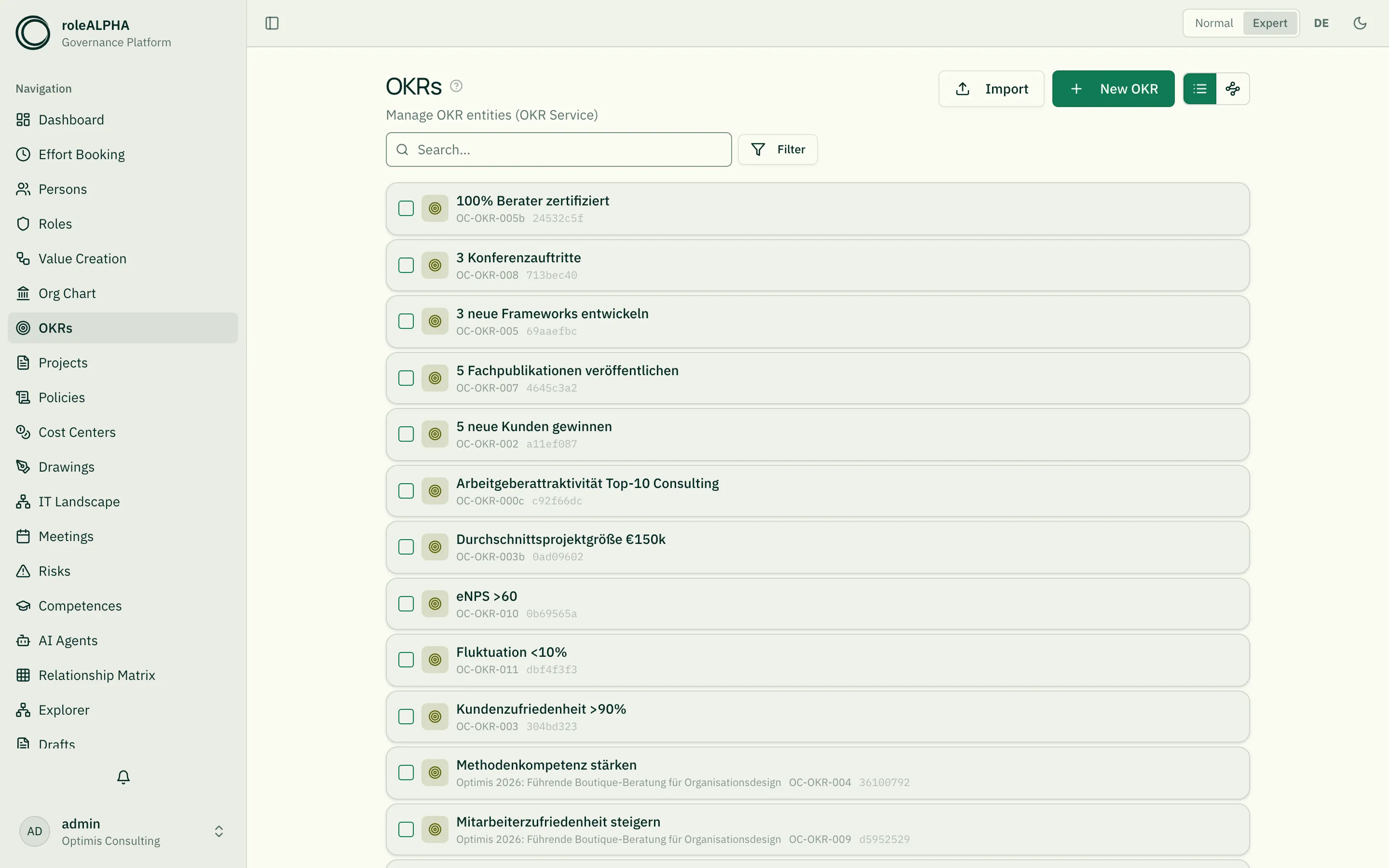
The diagram view: the explorer
Section titled “The diagram view: the explorer”Since 09/2026 the explorer draws the cascade — the same canvas as in every other area. The former dedicated OKR cascade is gone; it showed the same thing (measured: same nodes, same connections) but could only ever look one way. What a card shows is now stated by the entity type through its declaration.
Key results sit inside their objective’s card, not as separate boxes beside it — that is what the card declaration says, not the code.
What you gain on top: search and filters act on the picture, your arrangement survives the visit, cards can be selected and worked on together, the right-click menu is considerably richer, and connections carry their names.
Maintaining OKRs: objective + key results in one form
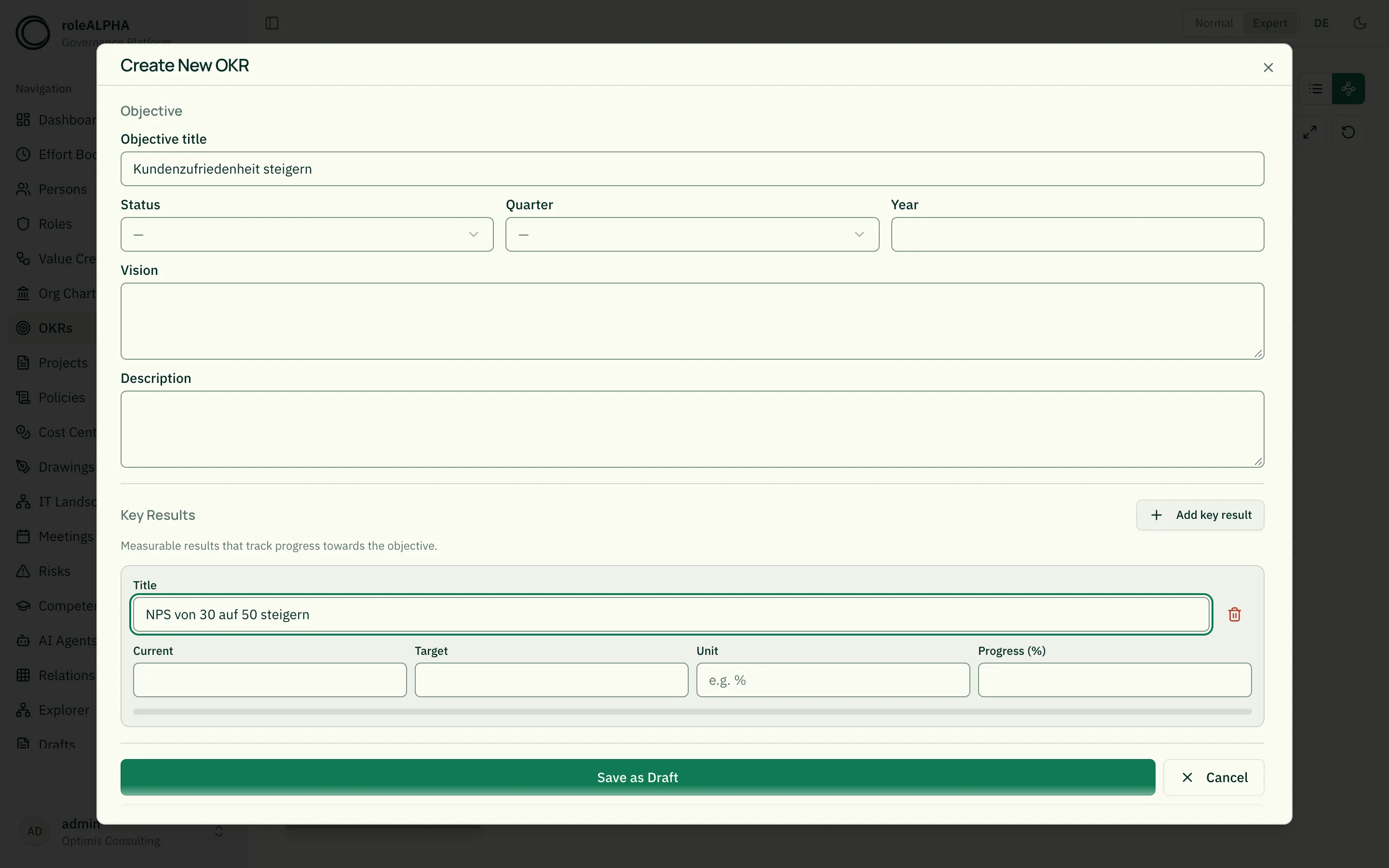
Section titled “Maintaining OKRs: objective + key results in one form”Previously you had to create an objective and each key result separately, then link them by hand. The OKR composer combines this into one form.
How it works:
- Click “New OKR” in the top-right — the composer opens.
- Fill in the objective fields at the top (title, status, quarter, year, vision, description).
- Below, use “Add key result” to add as many key results as tiles as you like — each tile has a title, current/target value, unit and progress.
- Finish with “Save as draft” or “Save & publish”. The objective, all
key results and the
HAS_KEY_RESULTlinks are created in one go.
To edit an existing objective, open it and click Edit — the same composer opens, pre-filled with the objective and its key results. Key results can be added, changed or removed here; removed KRs are prepared as a deletion draft. (A single key result you open directly is still edited in the regular edit form.)
The composer uses the same draft/approval flow as the rest of the app: “Save as draft” creates drafts you publish under Drafts; “Save & publish” runs through the entity type’s approval mode.
Important relationships
Section titled “Important relationships”- CASCADING (OKR → OKR) — objective hierarchy
- HAS_KEY_RESULT (Objective → KR) — key result assignment
- EXECUTES / OWNS (Person → OKR) — accountability
- BELONGS_TO (OKR → Cost Center/Project) — anchoring
Details: Relationship Types.
Schema to copy
Section titled “Schema to copy”{ "type": "object", "properties": { "subtype": { "type": "string", "title": "OKR type", "enum": ["objective", "key_result"] }, "description": { "type": "string", "title": "Description" }, "status": { "type": "string", "title": "Status", "enum": ["draft", "active", "completed", "cancelled"] }, "quarter": { "type": "string", "title": "Quarter", "enum": ["Q1", "Q2", "Q3", "Q4"] }, "year": { "type": "integer", "title": "Year" }, "vision": { "type": "string", "title": "Vision / parent goal", "showWhen": { "field": "subtype", "values": ["company_objective", "objective"] } }, "targetValue": { "type": "number", "title": "Target value", "showWhen": { "field": "subtype", "values": ["key_result"] } }, "currentValue": { "type": "number", "title": "Current value", "showWhen": { "field": "subtype", "values": ["key_result"] } }, "unit": { "type": "string", "title": "Unit", "showWhen": { "field": "subtype", "values": ["key_result"] } }, "progress": { "type": "number", "title": "Progress (%)", "showWhen": { "field": "subtype", "values": ["key_result"] } } }, "required": ["subtype"]}Objectives and key results remain one entity type, but they only share
status, quarter and year. Whatever belongs to one side only is controlled by
the template via [[entity-type-schema|showWhen]]:
- Target value, current value, unit, progress only appear on a key result.
- Vision only appears on a company goal or objective.
- Description, status, quarter, year apply to all.
This holds in the form and in the detail view, change preview and card. Existing tenants get the conditions added once — only on fields you have not given a condition yourself. If you remove one afterwards in the editor, it stays removed.
Demand instead of a wish
Section titled “Demand instead of a wish”On an objective you can state what it needs rather than wish for it: a demand with amount, time span, required activity and required competences. Several demands on the same objective are the normal case as soon as different work is needed — backend and UX are two demands, not one.
From then on three figures sit side by side on the objective at any time, without having to ask anybody: how much demand arose, how much is planned, and what remains open — per period, not just as a total. Where effort booking is used, actuals join them; where it is missing, that row is omitted visibly and not as a zero. See Demand & Resource Planning.
Detail view
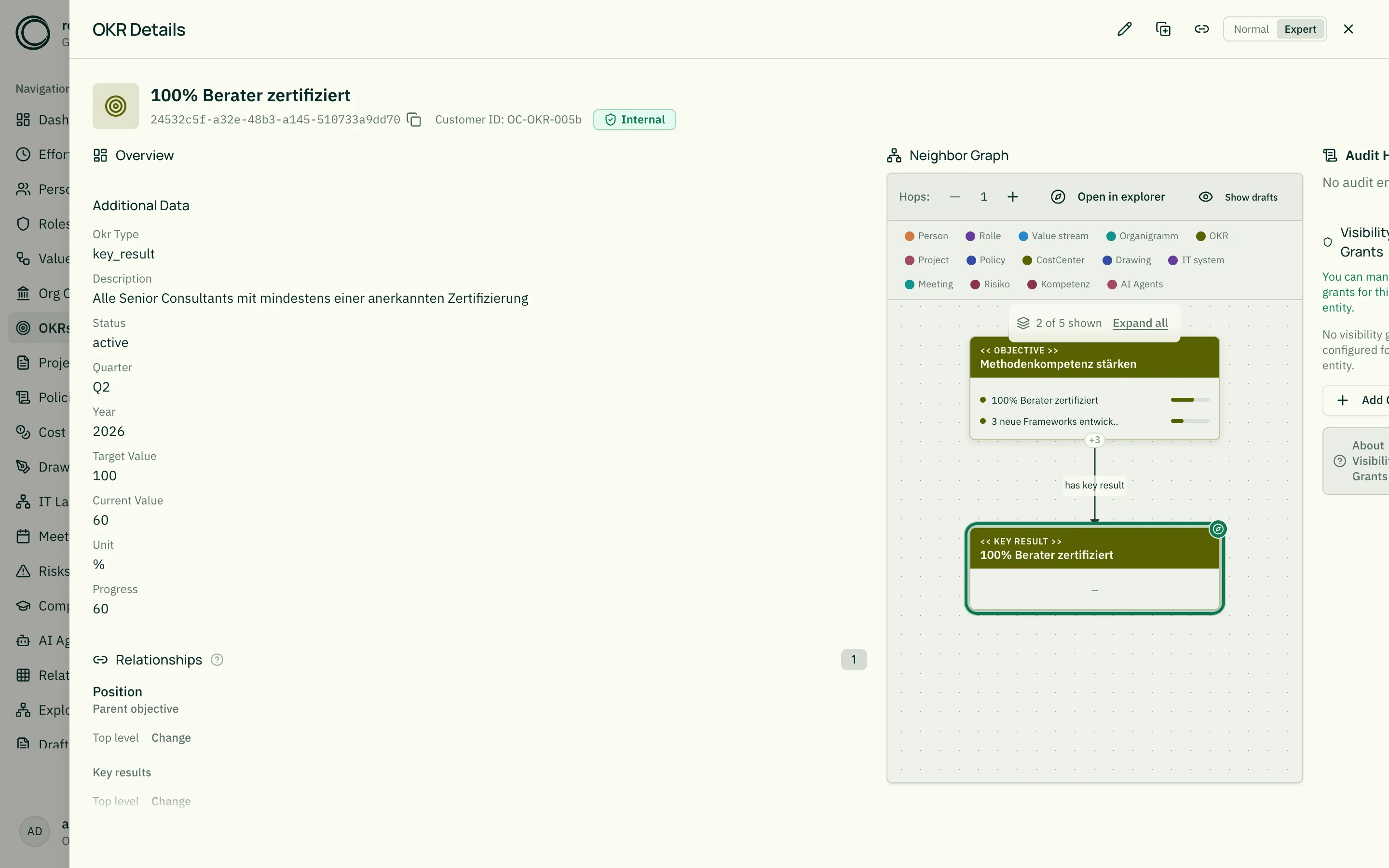
Section titled “Detail view”In an OKR detail view you see:
- Description as lead text
- Progress bar (for key results)
- Assigned key results as tiles with progress (for objectives, in normal mode) — readable at a glance, without technical fields
- Cascaded sub-objectives
- Responsible persons via EXECUTES/OWNS
Related
Section titled “Related”- Entity Types — What entity types are
- JSON Schema for Entity Types — JSON schema options,
showWhenfor KR fields - Persons — Owners of OKRs
- Relationship Types — CASCADING, HAS_KEY_RESULT in detail
- Level Slider – Collapse Large Hierarchies — Collapse levels of the cascade