

Value Creation
Dependencies · Data Nodes
- Links to: —
- Linked from: AI agents (via
AGENT_SUPPORTS_PROCESS), Competences (viaASSESSED_IN), Demands (viaORIGINATES_FROM)
Value streams structure how work gets done: routine activities, workflows, and value chains.
The ladder of terms
Section titled “The ladder of terms”A value stream is neither the smallest nor the largest unit, but one of four levels. The Level field says which one a record sits on:
| Level | What it means |
|---|---|
| Value chain | The whole thing seen from outside — “lead-to-cash”, “meter-to-cash”. |
| Value stream | One link in that chain that contributes something on its own. |
| Sub-stream | A breakdown of it, when a value stream is too coarse. |
| Activity | The single step that is not broken down further. |
The level is not mandatory. Maintaining it pays off as soon as you want to know whether an area is fully broken down, or whether an activity sits there without an owner — both questions need the distinction.
What is expressly not measured here
Section titled “What is expressly not measured here”“Value stream” here means the structure of the work: who is accountable for what, and what follows what. It is not value stream mapping in the Lean sense. roleALPHA records neither lead time nor waiting time, inventory, changeover times or flow efficiency, and computes no takt times. If you need those metrics you need a different tool — that is a deliberate boundary, not an open task. The related delimitation from process mining is in the Glossary.
What does exist is the booked effort per value stream (see below) — an actual figure about working time, expressly not a lead time and never person-level.
Purpose
Section titled “Purpose”A value stream bundles an activity with status, frequency and accountable parties. Value streams can depend on each other — an onboarding value stream, for example, depends on an approval process. The explorer makes this chaining visible.
Default view
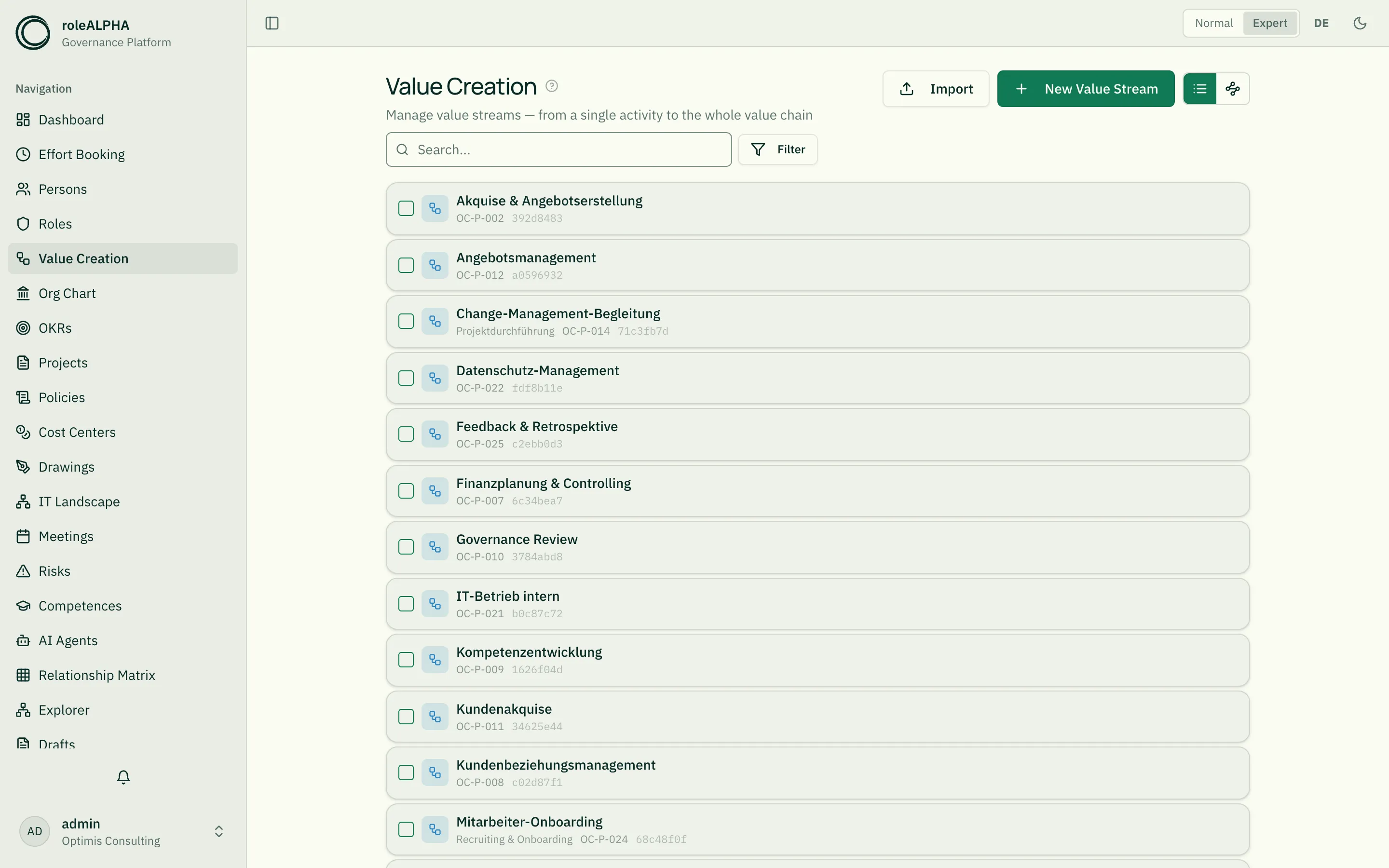
Section titled “Default view”Opening the page shows the picture — the explorer, see below. Via the view toggle you can switch to list view at any time.
The diagram view: the explorer
Section titled “The diagram view: the explorer”Since 09/2026 the explorer draws the value chain — the same canvas as in every other area. The former dedicated value stream map is gone; it showed the same thing (measured: same nodes, same connections, same groups) but could only ever look one way. What a card shows and what a box encloses is now stated by the entity type through its declaration — a tenant can configure it.
What you gain: search and filters act on the picture, your arrangement survives the visit, cards can be selected and worked on together, the right-click menu is considerably richer, and connections carry their names and values.
Circular dependencies are no longer reported by the view but by the governance analysis
(governance.relationship-cycle). It sees the whole tenant rather than one view, names the
chain in plain text and suggests which relationship to break.
Important relationships
Section titled “Important relationships”- DEPENDS_ON (Value stream → Value stream) — dependency chain
- EXECUTES (Person → Value stream) — person performs the value stream
- OWNS (Person/Role → Value stream) — value stream owner
- ASSESSED_IN (Competence → Value stream) — competence is assessed inside the value stream
- BELONGS_TO (Value stream → Organigramm/Cost Center) — structural anchor
Details: Relationship Types.
Schema to copy
Section titled “Schema to copy”{ "type": "object", "properties": { "description": { "type": "string", "title": "Description" }, "status": { "type": "string", "title": "Status", "enum": ["Active", "Under review", "Archived"] }, "frequency": { "type": "string", "title": "Frequency", "enum": ["Daily", "Weekly", "Monthly", "Quarterly", "Yearly"] } }, "required": ["description"]}Extension ideas: inputs and outputs as arrays, duration,
tooling, kpis. Schema options in detail: JSON Schema for Entity Types.
Ongoing operations as a demand
Section titled “Ongoing operations as a demand”A value stream consumes capacity before a single project starts — and in most organisations that is the larger share. On the value stream this can be stated: a run demand (“60 hours per month, from 1 January, no end date”) makes operations visible in the same utilization view as initiatives.
The difference is fundamental: today operations compete with projects for the same people but appear in no plan — with the familiar result that initiatives fail because “day-to-day business got in the way”.
Because a value stream step is itself a value stream, demands, assignments and bookings already hang off steps. The reports tab puts that together: one row per step with demand, plan and actuals — and highlighted, the step that is booked on without a recorded demand. See Demand planning reports and Running operations and initiatives.
Detail view
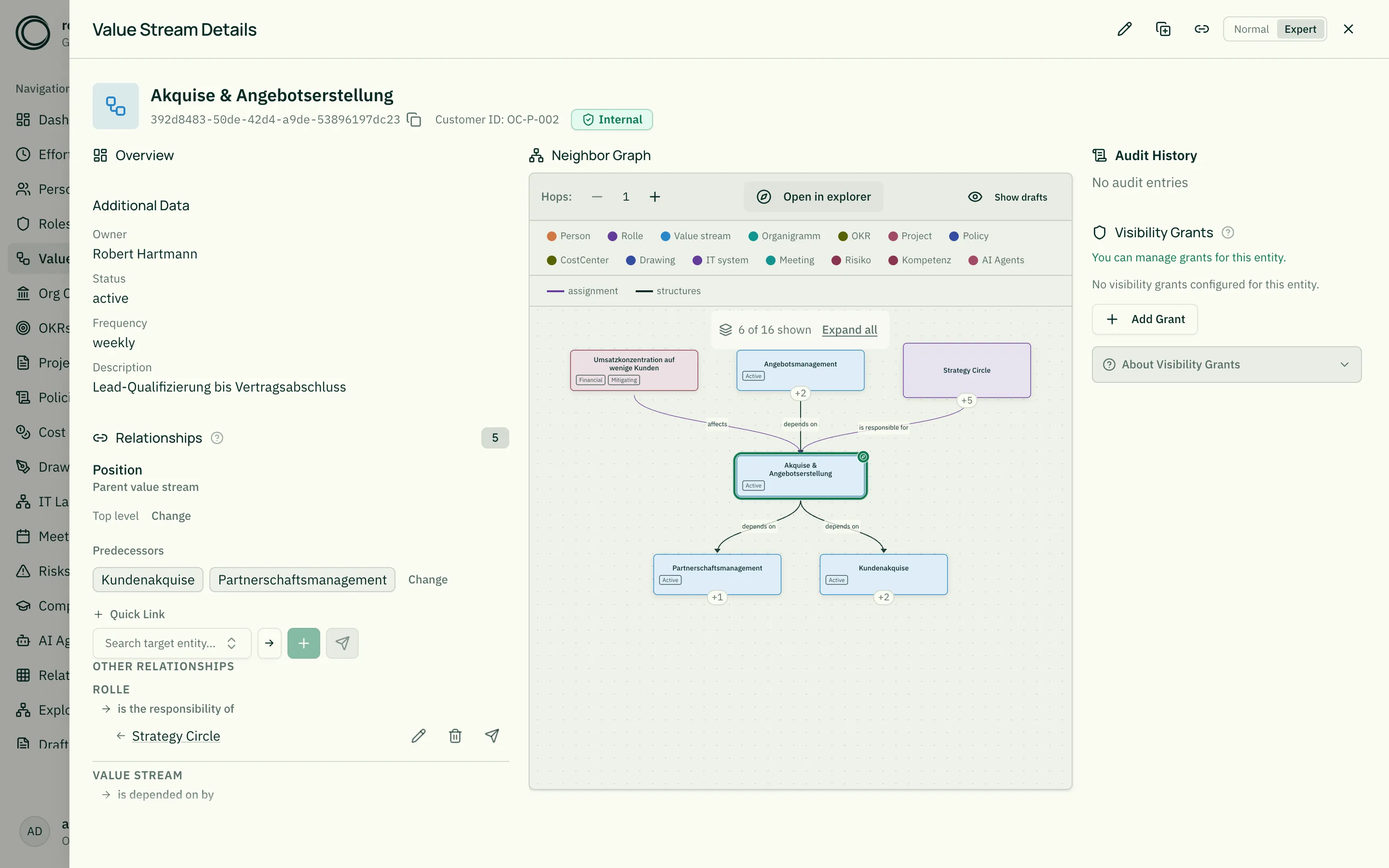
Section titled “Detail view”In a value stream detail view you see:
- Description as lead text
- Status and frequency as badges
- Upstream and downstream value streams (DEPENDS_ON both directions)
- Owners and executors via OWNS/EXECUTES
When your own relationship type does not order the sequence
Section titled “When your own relationship type does not order the sequence”The explorer draws every relationship — but it only orders the sequence along relationship
types whose role in the graph is known. One without a role is drawn as an undetermined edge
in warning colour: the connection is visible, but it does not put the steps one after another.
For the shipped types (DEPENDS_ON, HAS_SUBPROCESS) the role is declared.
For a type name of your own, the role is inferred from the name — which works for names
like “predecessor step” but not for “preparation”. In that case you can declare the role
explicitly: on the relationship type, under Meaning, set the field x-graph-role to one
of these values:
| Value | Meaning |
|---|---|
order-predecessor | Order: the target comes before the source |
hierarchy-parent | Decomposition: the source is the parent element |
assignment | A person or agent takes something on |
coverage | Someone is responsible or accountable |
membership | Belonging to a group or unit |
A declared role always wins over inferring from the name. This also fixes the reverse case: a type named “subvention” would otherwise be read as a decomposition because of “sub”.
Circular dependencies
Section titled “Circular dependencies”If you model “A depends on B” and “B depends on A”, there is no valid order left. The explorer stays usable and draws both edges — it simply can no longer put the steps one after another.
The contradiction is named in governance mining: the cycle finding lists the value streams involved as a chain. Resolve one of the dependencies and it disappears.
Related
Section titled “Related”- Entity Types — What entity types are
- JSON Schema for Entity Types — JSON schema options
- Roles — Roles owning value streams
- Competences — Competences assessed in value streams
- Relationship Types — DEPENDS_ON, EXECUTES, OWNS in detail