

AI usage and cost forecast
At the top of Settings › AI you see your tenant’s AI usage for the current month. It is always visible — even if AI is switched off or you use your own keys everywhere.
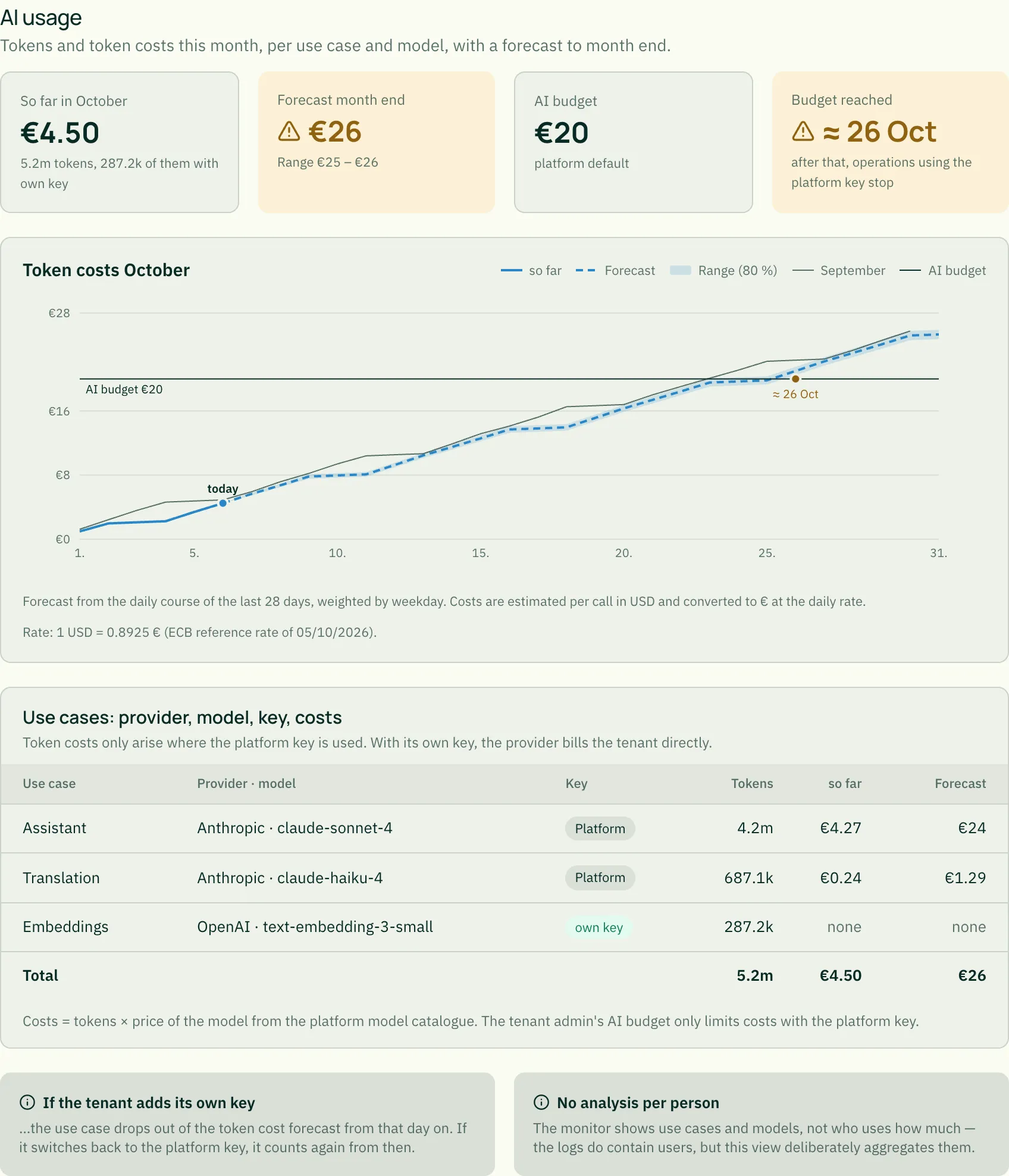
The four key figures
Section titled “The four key figures”- So far this month — token costs since the first of the month, below it the total tokens and how many of them used an own key.
- Forecast month end — what to expect at month end, with a range: in four out of five months with a similar course, the value lands within it.
- AI budget — the monthly limit for token costs. You set it under Quotas & features; without your own setting the platform default applies.
- Budget reached — the day the budget would be reached according to the forecast, or “not this month”. If it has already been reached, the date is shown; operations using the platform key then stop until month end. Operations with your own key and access to your data continue.
If the forecast exceeds the budget, the two right-hand figures are marked as a warning (icon and colour); if the budget has already been reached, as an error.
The chart
Section titled “The chart”The line shows token costs accumulated over the month:
| Sign | Meaning |
|---|---|
| solid line | what has been incurred so far |
| dashed line | the forecast from today — not yet happened |
| light area | the range of the forecast (80 %) |
| thin grey line | the previous month, day by day |
| horizontal line | the AI budget |
The legend only lists what is currently drawn. Hovering over the chart shows the values of the day.
How the forecast is made: from the daily course of the last 28 days, averaged per weekday — a Monday counts like the last four Mondays. Days without use count as zero, so a new tenant gets a cautious forecast rather than an invented one.
Costs only with the platform key
Section titled “Costs only with the platform key”Token costs only arise where the platform key is used. With an own key the provider bills you directly: the monitor shows the tokens there, but “none” as costs. The AI budget only limits costs with the platform key. If you switch a use case to your own key, it drops out of the token cost forecast from that day on.
The table
Section titled “The table”Per use case (assistant, translation, embeddings, knowledge from conversations …), provider and model and key (platform or own): tokens, costs so far and forecast. The cost of each call is estimated in US dollars from the model’s price in the platform model catalogue.
Euros and exchange rate
Section titled “Euros and exchange rate”Providers bill in US dollars. Amounts are converted with the European Central Bank’s reference rate, which the platform fetches daily; rate and date are shown below the chart. The ECB publishes no rate on weekends and holidays — if a current rate is missing for longer, the last known rate applies and the note gives its date. If no rate is known at all, amounts read “not measurable” rather than a guessed number.
What the monitor deliberately does not show
Section titled “What the monitor deliberately does not show”No analysis per person. The logs do record who made a request; the monitor deliberately aggregates by use case and model and names nobody.
Related
Section titled “Related”- Your own AI keys — own keys per purpose
- Choosing chat models — which models the assistant may use
- Usage Analytics — usage of the application overall