

Quotas & unlocks
All Data Nodes and features are available to your tenant at no extra cost. What you set under Settings › Organisation › Quotas & unlocks only limits operations that cause real third-party costs — AI providers and compute time — and unlocks features that need a deliberate decision. Only tenant admins see this page.
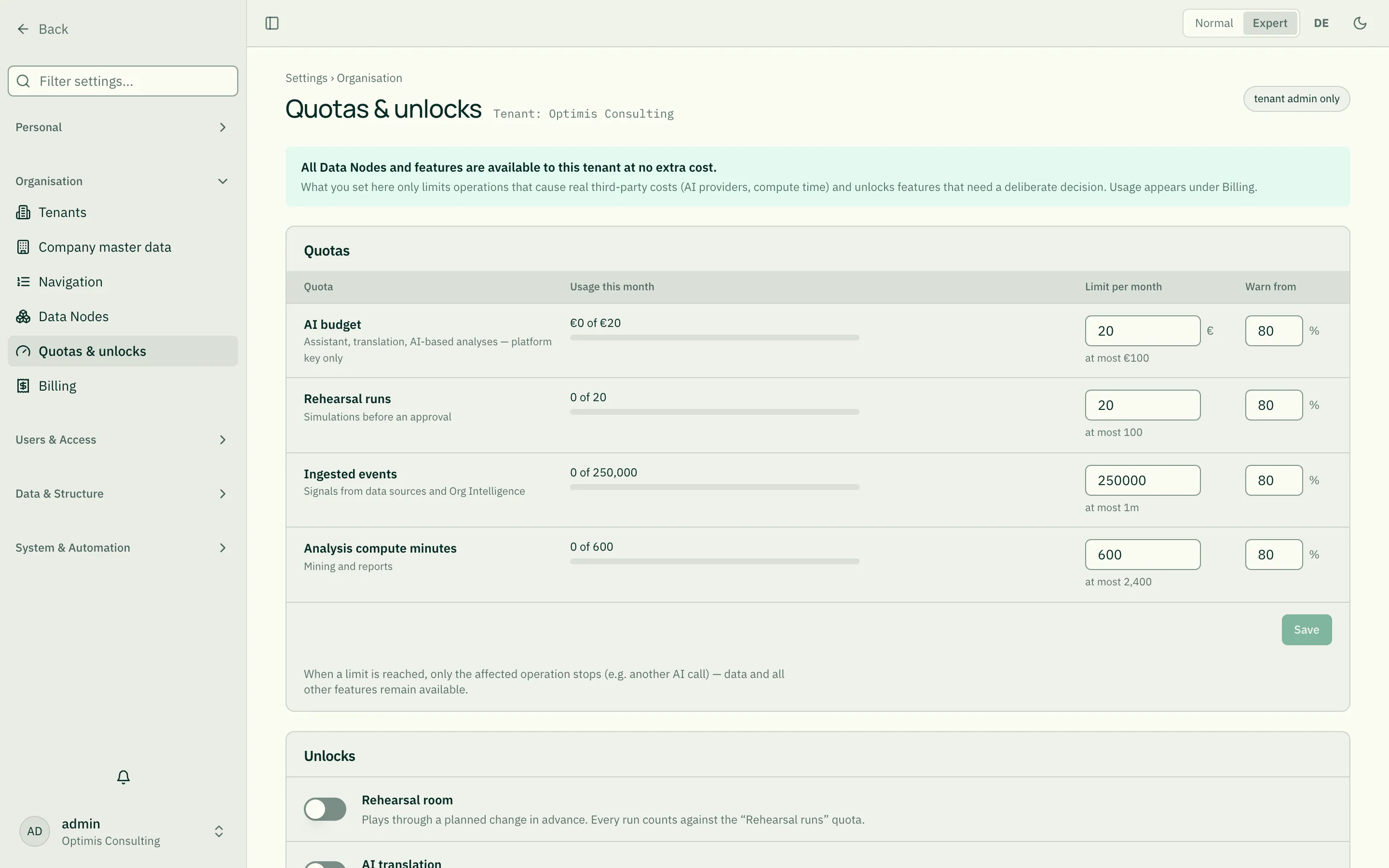
Quotas
Section titled “Quotas”For each quota you see the usage this month with a bar, the limit per month and from which share a warning is shown.
| Quota | What is counted |
|---|---|
| AI budget | Costs of the assistant, translation and AI-based analyses, in euros — only what runs on the platform key. With your own key there are no costs. |
| Rehearsal runs | Simulations of a planned change before approval. |
| Ingested events | Signals from data sources and Org Intelligence. |
| Analysis compute minutes | Run time of mining and reports. |
Change a limit: enter a number (in euros for the AI budget) and Save. Below the field is the ceiling up to which you can choose freely — roleALPHA sets it per tenant. A value above it is flagged in the field, and the server does not accept it either. An empty field means “unlimited” and is only possible when there is no ceiling. If you need more, agree a higher ceiling with roleALPHA.
Warn from (1–100 %): from this share of the limit the usage is shown in the warning colour with “warning threshold exceeded”.
What happens when a limit is reached? Only the affected operation is refused (e.g. another AI call). Your data and all other features remain available. If usage cannot be measured right now, it says so — and the operation is refused as a precaution as well.
Unlocks
Section titled “Unlocks”| Unlock | Meaning |
|---|---|
| Rehearsal room | Plays through a planned change in advance. Every run counts against “Rehearsal runs”. |
| AI translation | Content is sent to your tenant’s AI provider for translation. |
| Person-level analysis | Analyses at the level of individual persons instead of aggregated. Clarify co-determination and data protection internally first — while off, results stay aggregated. |
| ISO 9001 report | coming soon — cannot be switched yet. |
A switch takes effect immediately. Org Intelligence is not switched here but as a Data Node under Data Nodes.
Who changed what?
Section titled “Who changed what?”Below the page is the last change to quotas or unlocks with name and date; Change log → leads to the full log. If roleALPHA changes something on your behalf, it appears there marked “on behalf” with a reason.
Related
Section titled “Related”- Billing — what is billed
- Settings at a glance