

Assigning the person behind a role
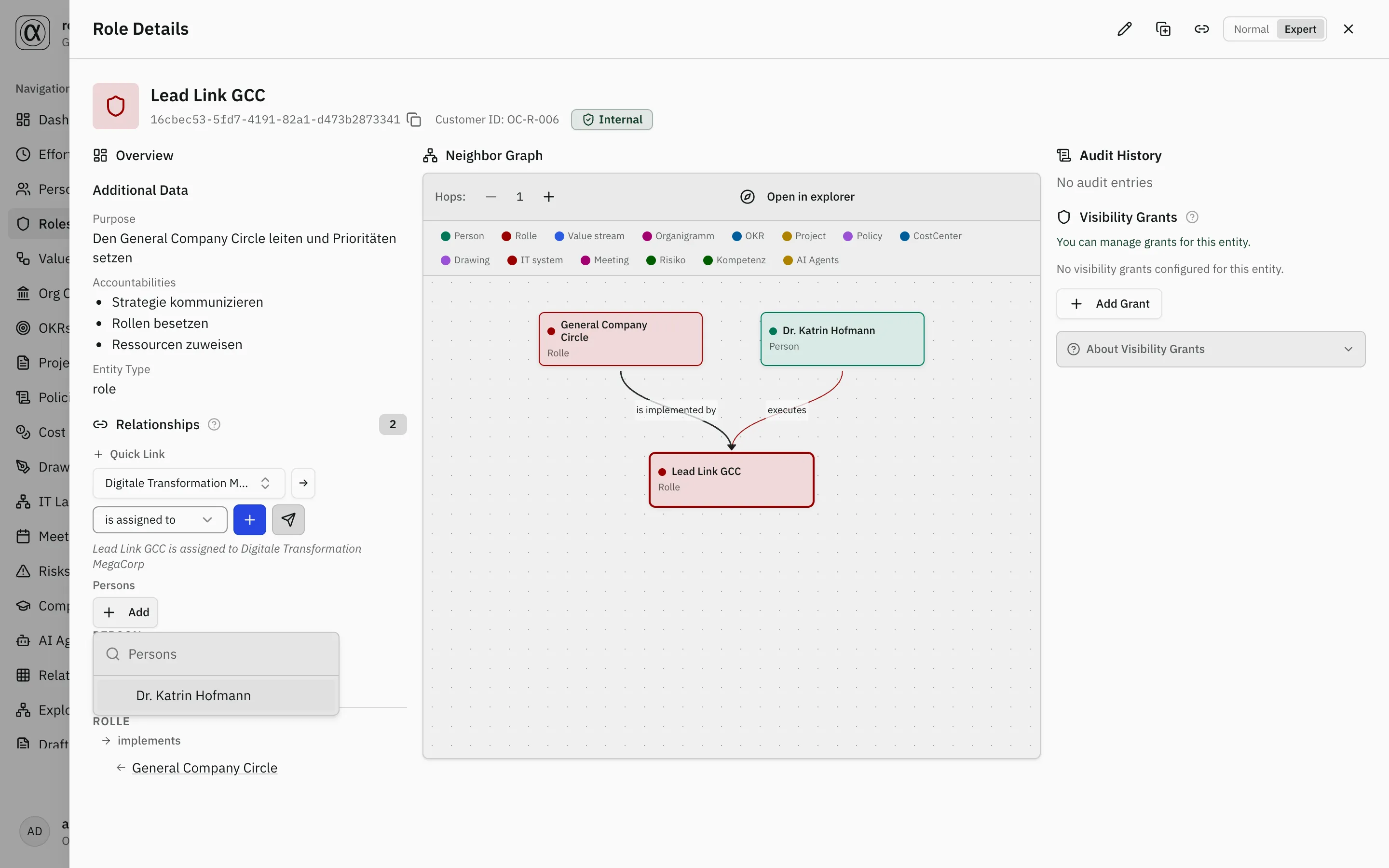
Some relationships need more than two participants. When you assign a
role to a project (e.g. @Operations Lead), you often also want to
record which person actually fills that role on the project. That is
what a relationship with participants expresses:
“Person P works in role R on project Pr.”
Creating the assignment
Section titled “Creating the assignment”The direct route goes through the project form — when creating as well as when editing:
- Click “New project” (or open a project and choose Edit).
- Below the domain fields sits the Responsibility section with the field Responsible role. Pick the role there.
- Only then does the Persons field below it fill up — with exactly those who hold that role. Add one or several.
- Publish. The project and its assignment are created in one go; you do not have to save first and link afterwards.
Replacing a person — not adding one
Section titled “Replacing a person — not adding one”Important: when the staffing changes, change it in the same field. Open the project; under the Relationships tab sits the Persons field — click “Change”, remove the old name, pick the new one, publish. You do not need a form for that; see Understanding Relationships.
What you should not do is create the assignment a second time via the quick link. That creates a second relationship of the same kind, and afterwards the organisation says “responsible” twice, once correctly and once out of date. The form field is bound to the existing relationship and changes it; the quick link always creates a new one.
Several relationships of the same kind are, by the way, allowed and sometimes right — two staffing periods of the same role on the same project, for instance. roleALPHA therefore does not prevent them but points out on approval that a relationship of the same kind already exists.
Only the word-for-word repetition is rejected — same objects, same details, same participants (see Understanding Relationships). When you replace a person that explicitly does not help you: the old and the new staffing differ, so to the application they are two statements and both may stand. That the old one should go is something only you know — hence the route through the same field rather than a second link.
Only the matching persons
Section titled “Only the matching persons”The person picker shows only the role holders — the persons who
actually perform the selected role via the “executes” (EXECUTES)
relationship. That way you pick the person unambiguously. If a role has
no holders yet, the list stays empty.
And if someone does not (or no longer) hold the role? The list only applies to picking. A person who is already entered stays, even if they no longer hold the role or never did (for example from an older state or an import). You then see them by name with the note “does not hold the role”. roleALPHA does not remove them on its own. Decide what is right: take the person out of the field, or give them the role via “executes”.
Where participants show up
Section titled “Where participants show up”- In the “Relationships” section the assigned persons appear as clickable chips right below the assignment — in both the Normal and the Expert view.
- On the person detail page, the “Relationships” section has a block “Involved in”: which projects the person is staffed on and in which role, e.g. “Bilddatenbank · as Operations Lead”. Clicking the name opens the project. Anyone who appears in a person’s lane on the project Kanban can therefore also be found on that person’s own page.
Beyond roles and persons
Section titled “Beyond roles and persons”The mechanism is not limited to persons and roles. Any assignment can carry additional participants if the relationship type declares them — including transversally within a circle.
Configuration (for administrators)
Section titled “Configuration (for administrators)”Whether a relationship type carries participants is data-driven and lives
on the relationship type itself — in its descJsonb field under the
participants key. Each entry describes a slot (a capacity) that holds
participants of a specific entity type.
{ "participants": [ { "slot": "holder", "moduleId": "person", "min": 0, "max": null, "label": { "de": "Personen", "en": "Persons" }, "filterByExecutes": { "baseEndpoint": "from", "relType": "EXECUTES", "participantSide": "source" } } ]}Fields per slot
| Field | Required | Meaning |
|---|---|---|
slot | yes | Stable key of the capacity (e.g. holder). Stored per participant. |
moduleId | yes | Module/entity type of the participants (e.g. person, ea for software systems). |
min / max | no | Cardinality. max: null = unlimited (N participants). |
label | no | Display label per language (de / en). |
filterByExecutes | no | Opt-in filter. If absent, the picker is unrestricted (all entities of moduleId). |
filterByExecutes (2-hop restriction)
| Field | Meaning |
|---|---|
baseEndpoint | Which end of the base relationship holds the anchor entity: from or to. In the example, the role (source). |
relType | Which relationship type to filter through (incumbency), usually EXECUTES. |
participantSide | Which side of that edge the candidate is on: source or target. |
The example reads as: “candidates are persons who perform the source role
via EXECUTES” — i.e. exactly the role holders.
Evaluation goes through a single resolver; the values are never hardcoded in application code but read solely from this configuration. That lets each tenant define its own assignments.
Related
Section titled “Related”- Understanding Relationships — Relationship fundamentals
- Relationship Types — Relationship types and their constraints
- Roles — Roles and their holders